When "Root" Isn't the Object Owner: Why Read-Only Grants Failed on Amazon RDS PostgreSQL
How an RDS ownership nuance broke read-only access, and the fix that made it reliable.

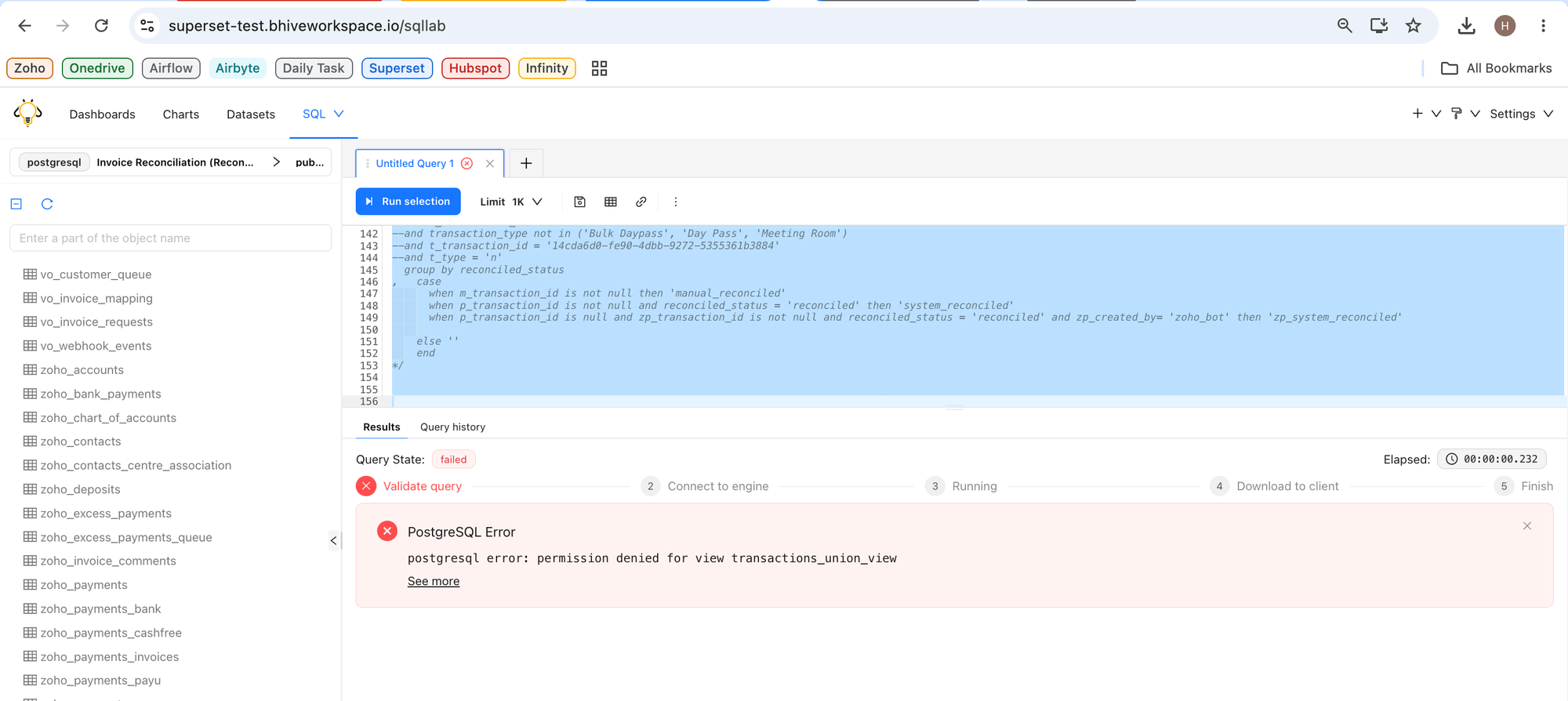
A few days ago I ran into one of those PostgreSQL problems where everything looked right.
We had two read-only users, domain_readonly and hardik, that were supposed to access a PostgreSQL database through Superset. The grant script completed successfully, PostgreSQL returned COMMIT, and the script happily announced that the refresh was complete.
Yet Superset kept throwing:
permission denied for relation sales__deals
permission denied for view transactions_union_view
The obvious suspects weren't the problem.
The users existed.
The passwords were correct.
They could connect to the database.
The grant script finished successfully.
So why couldn't they read the tables?
It turned out the issue wasn't the read-only users at all.
It was the account performing the GRANT.
The Setup
The permission model was intentionally simple.
Application (dbt) role
        │
        ▼
Owns all application tables

Read-only roles
        │
        ▼
Receive SELECT access only

Superset
        │
        ▼
Reads through the read-only users
The important roles were:
domain            -> owns application tables
domain_readonly   -> reporting user
hardik            -> reporting user
postgres          -> Amazon RDS master account
Our refresh script was responsible for:
- Granting database
CONNECT - Granting schema
USAGE - Granting
SELECTon existing tables - Revoking write privileges
- Configuring
ALTER DEFAULT PRIVILEGESfor future tables
On paper, everything should have worked.
Everything Looked Successful
The script completed normally.
DO
DO
DO
COMMIT
There were no obvious failures.
The audit confirmed the users were read-only.
Nothing suggested there was a permission problem.
Except Superset still couldn't query the data.
That immediately told me one thing:
A successful transaction isn't the same thing as successful access.
The Audit That Changed Everything
The refresh script prints an audit showing the effective permissions.
One section immediately stood out.
    username     |      schema_name       | can_use_schema | tables_total | tables_missing_select
----------------+------------------------+----------------+--------------+-----------------------
 domain_readonly | infinity_domain        | t              |           36 |                     0
 domain_readonly | sales_domain           | t              |           11 |                    11
 domain_readonly | sales_domain_snapshots | f              |           11 |                    11
The pattern was impossible to ignore.
infinity_domainwas fully readable.sales_domainhad schema access but no table access.sales_domain_snapshotsdidn't even have schema usage.
The users were genuinely read-only.
They just couldn't read anything useful.
Looking at Ownership Instead of Permissions
At this point I stopped looking at the read-only users and started looking at ownership.
A catalog query immediately explained the split.
| Schema                   | Schema owner | Table owner | Tables | `domain_readonly` |
| ------------------------ | ------------ | ----------- | -----: | ----------------- |
| `infinity_domain`        | `postgres`   | `postgres`  |     36 | `SELECT` on 36/36 |
| `sales_domain`           | `postgres`   | `domain`    |     11 | `SELECT` on 0/11  |
| `sales_domain_snapshots` | `domain`     | `domain`    |     11 | `SELECT` on 0/11  |
That explained everything.
Every table that worked was owned by postgres.
Every table that failed was owned by domain.
The read-only users weren't missing privileges randomly.
They were missing privileges only on objects owned by another role.
Why postgres Was Not Root on RDS
That was my assumption too.
On a self-managed PostgreSQL instance, a superuser can bypass normal ownership checks.
Amazon RDS is different.
The postgres account is the RDS master account, but it is not a real PostgreSQL superuser.
Internally it has the AWS-managed rds_superuser role, but PostgreSQL still reports it as:
NOSUPERUSER
That turns out to be a very important distinction.
The practical rule becomes:
The account executing GRANT SELECT must either own the object, inherit the owning role, or already possess the grant option. Simply being the RDS master account does not satisfy those conditions.For the failing tables, postgres satisfied none of those requirements.
Everything PostgreSQL was doing suddenly made perfect sense.
Why the Script Still Reported Success
The next question was obvious.
If the grants were failing...
...why did the script happily print COMMIT?
The answer was surprisingly simple.
Each grant operation was wrapped inside its own PL/pgSQL block.
If one table failed, PostgreSQL raised a warning instead of aborting the transaction.
Those warnings went to stderr.
Our logs only captured stdout.
So the log looked like this:
DO
DO
DO
COMMIT
while all the useful warning messages were sitting on stderr.
The audit also had another blind spot.
It only verified that the read-only users couldn't write.
It never checked whether they could actually read.
That meant a user with zero write permissions and zero read permissions still passed validation.
Technically read-only.
Practically useless.
The First Fix That Didn't Work
Our first thought was to temporarily make postgres inherit the domain role.
Unfortunately, the role graph already contained a reverse membership.
domain -> postgres
Trying to add the opposite direction created a cycle.
domain  -> postgres
postgres -> domain
To work around that, the scripts gained an optional --break-owner-cycle flag that could temporarily remove the reverse edge, perform the grants, and restore everything in the same transaction.
It sounded reasonable.
It didn't solve the problem.
The reason was simple.
Removing the cycle doesn't magically create authority.
postgres still wasn't the object owner.
It still wasn't a member of domain.
It still didn't have the required grant options.
The grants continued to fail.
The Real Fix
Instead of trying to make the RDS master account behave like the owner...
...we simply let the owner perform the grants.
The scripts now support optional owner credentials.
--owner-user USER
--owner-password-env ENV
Nothing changes for existing users.
If those flags aren't supplied, the scripts behave exactly as before.
When they are supplied, the owner role connects to the database and performs:
- Existing table grants
- Schema grants
- Sequence grants
- Default privilege configuration
- Final audit
The administrative account still creates the login roles.
The object owner performs object-level grants.
That split follows PostgreSQL's ownership model instead of trying to work around it.
Verifying the Fix
After the owner-based grant completed, verifying access became straightforward.
SELECT has_schema_privilege(
    'domain_readonly',
    'sales_domain_snapshots',
    'USAGE'
);

SELECT has_table_privilege(
    'domain_readonly',
    'sales_domain.sales__deals',
    'SELECT'
);

SELECT has_table_privilege(
    'hardik',
    'sales_domain.sales__deals',
    'SELECT'
);
The expected result is simply:
t
t
t
The audit should also report:
tables_missing_select = 0
tables_with_write_privs = 0
One more thing is worth remembering.
Granting access to today's tables isn't enough.
If dbt creates new tables tomorrow, they'll inherit whatever default privileges the owner has configured.
Without ALTER DEFAULT PRIVILEGES, the exact same problem quietly comes back after the next deployment.
Lessons Learned
1. The RDS master account is not a PostgreSQL superuser
This was the biggest takeaway.
The postgres account is an administrative entry point, but PostgreSQL ownership rules still apply.
Object ownership always wins.
2. A successful transaction doesn't mean the permissions are correct
COMMIT only proves the transaction finished.
It says nothing about whether every grant actually succeeded.
Always verify the effective permissions.
3. Read-only validation should verify readability
Checking that a user can't modify data isn't enough.
A read-only user should also be able to read every table it's expected to access.
A good audit should fail when:
- A schema is missing
USAGE - A table is missing
SELECT
not just when write permissions exist.
4. Capture stderr
Most of PostgreSQL's useful warnings were sitting on stderr.
Capturing both streams immediately makes troubleshooting much easier.
./grant_rds_postgres_existing_user_readonly.sh ... \
    2>&1 | tee readonly-grants.log
5. Be careful with automatic role membership
Automatically granting owner roles to application users sounds convenient.
It's also an easy way to create privilege cycles or accidentally inherit far more permissions than intended.
Role membership should be deliberate, narrowly scoped, and treated as a security-sensitive change.
Closing Thoughts
Looking back, PostgreSQL was behaving exactly as designed.
The incorrect assumption was ours.
We treated the Amazon RDS master account like a traditional PostgreSQL superuser.
On a self-managed PostgreSQL instance that assumption usually holds.
On Amazon RDS, it doesn't.
The long-term pattern ended up being surprisingly simple.
Create login roles with the administrative account

↓

Grant object permissions as the object owner

↓

Audit effective SELECT and write privileges

↓

Configure default privileges for future objects
Once we switched the grant transaction to run as the domain owner, both read-only users immediately received the expected access, future tables inherited the correct permissions, and the mystery "permission denied" errors disappeared.
Sometimes the fix isn't changing PostgreSQL.
It's changing the assumptions you brought into it.
References
- PostgreSQL 16
GRANT: https://www.postgresql.org/docs/16/sql-grant.html - PostgreSQL 16 Role Attributes: https://www.postgresql.org/docs/16/role-attributes.html
- Amazon RDS
rds_superuser: https://docs.aws.amazon.com/AmazonRDS/latest/UserGuide/Appendix.PostgreSQL.CommonDBATasks.Roles.rds_superuser.html