I Thought VM Isolation Was Enough. My CPU Disagreed
I decided to rent out a VM on my homelab. Before handing over root, I attacked my own lease, fixed what it found, and ended up turning off hyperthreading. Proxmox went from 80 CPUs to 40, and my CPU graphs nearly doubled for the same work.

It's almost 2 a.m., and I'm looking at my Proxmox dashboard. Something looks off.
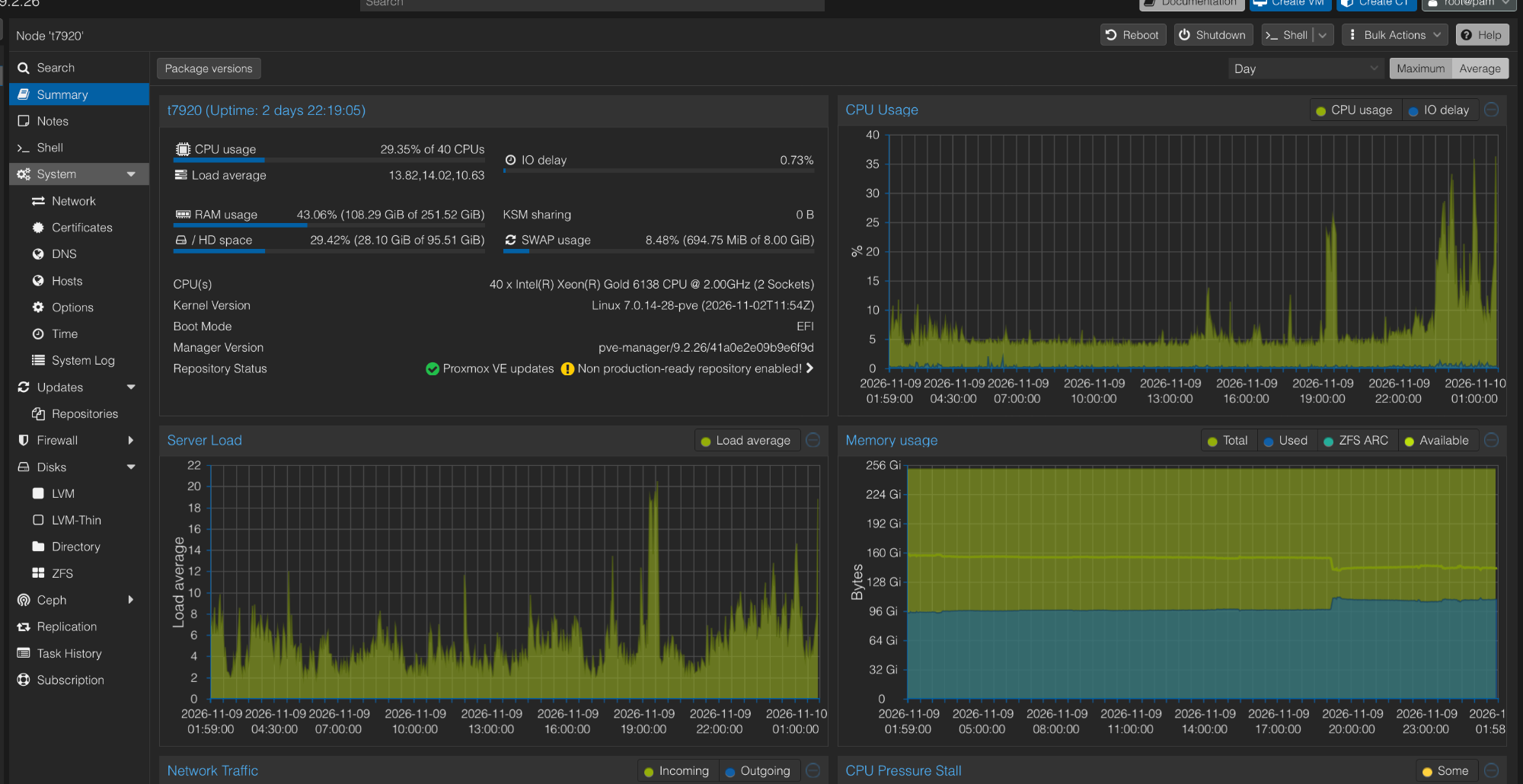
The server says:
CPU usage: 29.35% of 40 CPUs
Forty? It has always said eighty. And the CPU graph, which had been sitting around 5% for days, was now spiking past 30%.
So what happened? Nothing was broken. I'd turned off half the logical CPUs on my server a few hours earlier, on purpose, and there was a pretty good reason for doing that.
This started with something fairly simple: I decided to rent out a VM to a friend. I had plenty of spare resources, and it seemed like a good way to put the hardware to use. What I hadn't really considered was how much more complicated things get when someone else has root on a machine sitting in your house.
That one decision turned into a security audit, a pile of firewall changes, some rather interesting CPU behaviour, and a few hours of debugging things I didn't even know were running.
Here's what happened.
The Machine With Too Much Room
For some context, my main homelab machine is a Dell Precision T7920. I've written about how I ended up with it, so the short version:
- 2x Intel Xeon Gold 6138 (20 cores, 40 threads each)
- 256 GB DDR4 ECC RAM
- RTX A5000 with 24 GB VRAM
- Proxmox running all my VMs and containers
It hosts pretty much everything I run: my firewall, dev environment, AI workloads, monitoring, work VM, and a bunch of smaller services. On a normal day, the machine barely breaks a sweat. Most of the time, it keeps around 3 to 6 of its 80 logical CPUs busy.
So when a friend asked if they could get a VM for their own projects, I didn't really have a reason to say no. There's plenty of capacity sitting unused anyway.
But then I started thinking about what actually happens when you give someone root on a VM running on your hardware. They'd be sharing the same physical machine as my dev environment (SSH keys, GPG keys, tokens), my work VM, my firewall, and the hypervisor itself.
I trust the person I'm renting it to. But that's not really the point. Their VM could get compromised, someone could get into their root account, or they could just accidentally do something stupid. And I don't want a compromised VM becoming a problem for everything else running in my house.
So before handing it over, I decided to do two things:
- Put together an actual hosting agreement covering access, abuse, data, and what I log.
- Audit the isolation and see what someone with root inside that VM could actually reach.
The second part turned out to be much more interesting.
Attacking My Own Lease
I didn't want to just read firewall rules and assume everything was fine. So I ran the audit with my AI coding agent (Claude Code) doing most of the hands-on work, and me steering. If you read my last post, you know this isn't new for me.
We created a throwaway tenant VM using the same provisioning script I'd use for an actual lease: a separate SSH key, the same network setup, the same resource limits, everything. Then we got inside it and started poking around. Basically, I wanted to see how far I could get as a tenant who wasn't particularly interested in behaving.
The good news was that most of the isolation worked. From inside the canary VM:
- All 25 private targets we tried were unreachable. That included the Proxmox UI and SSH, my home router, monitoring, the security stack, my dev and AI VMs, and my work VM.
- Outbound SMTP on port 25 was blocked, both by DNS name and by raw IP.
- Spoofed source IPs and MAC addresses were dropped.
- Bandwidth and disk limits held: 11.8 MB/s against a 12.5 MB/s network cap, and 89 MB/s against a 100 MB/s disk cap.
So far, so good. Then I started looking at what I couldn't see, and that was a much bigger problem.
The isolation was working. The visibility wasn't.
Allowed Traffic Wasn't Being Logged
My firewall had a rule letting tenant VMs reach the internet, but it wasn't logging those connections. No NetFlow, DNS query logging was off, and Suricata (my IDS) wasn't even attached to the tenant interface.
We tested this by sending the same IDS test string from my dev network and from the canary VM. The dev network generated two alerts.
The canary generated zero.
If someone ever complained about abuse coming from my home IP, I wouldn't have been able to tell which VM did it.
Blocked Traffic Wasn't Being Logged Either
The Proxmox per-VM firewall was doing its job. It had already dropped over 24,000 packets headed for private IP ranges. But there was no log target configured, so the packets were being counted, and that's it. No record of who sent what, or when.
DNS Could Skip My Resolver
The tenant could just ask 1.1.1.1 or 8.8.8.8 directly. So even if I turned on DNS logging, it would only see the queries a tenant chose to send me.
The Tenant Could See My Work VM
Not reach it, but see it. The lease and my work VM sat on the same layer 2 network, and the canary's neighbour table had my work VM's MAC address in it. Traffic between them was dropped both ways. Still, I didn't love it.
The Firewall Was a Potential Bottleneck
Every network segment eventually goes through one OPNsense VM with just 2 vCPUs and a single state table. A tenant generating enough small packets could potentially degrade networking for everything else.
And then there was the CPU. I checked the kernel's vulnerability files:
l1tf:              ... SMT vulnerable
mds:               ... SMT vulnerable
mmio_stale_data:   ... SMT vulnerable
tsx_async_abort:   ... SMT vulnerable
gather_data_sampling: Vulnerable
Four of these immediately caught my attention. They were mitigated, but with an asterisk: the mitigations aren't enough when two different workloads share the same physical CPU core. This was something I hadn't even thought about when I decided to rent out a VM.
Fixing Things Before Handing Over Access
That evening turned into a fairly long list of changes. I didn't want to just make changes and call them done, so almost every fix was tested from a second canary VM, built with the same provisioning process.
Here's what changed:
- Every new outbound connection from the tenant networks is now logged and shipped to Loki, along with every DNS query. Suricata now watches every inside interface.
- Blocked traffic is logged at the hypervisor level, with counters exported for monitoring.
- Leased VMs now have their own network segment. They no longer share layer 2 with my work VMs.
- DNS sent directly to
1.1.1.1or8.8.8.8from a lease gets quietly redirected to my resolver, and logged. - Per-source connection limits on the firewall. A burst of 700 connections from the canary got it banned automatically.
- Per-VM packets-per-second limits. A 160k packets/s burst had 85% of its packets dropped.
- Leased VMs now get a CPU model without AVX or AVX2. I'll get to why shortly.
Then we tested again. The canary's 42 outbound connections showed up in Loki with the right source address, and its SMTP attempt and private-range probes fired actual alerts. Much better.
But there was still one thing I wasn't comfortable with: the CPU. And that's where I ended up running one rather interesting command:
echo off > /sys/devices/system/cpu/smt/control
Yep. Hyperthreading was now disabled. It's wrapped in a small systemd unit that runs before any VM starts, so it should survive a reboot too. I haven't rebooted to prove that yet.
Where Did My 40 CPUs Go?
If you've worked with Linux or Proxmox, you've probably run into the difference between physical cores and logical CPUs. My two Xeon Gold 6138s have 20 physical cores each. With Hyperthreading (Intel's version of SMT) enabled, each physical core shows up as two logical CPUs. So:
2 sockets x 20 cores x 2 threads = 80 logical CPUs
Disable SMT, and the extra threads go offline:
2 sockets x 20 cores = 40 physical cores
Nothing was actually lost. The machine still has all 40 physical cores; it just can't run two hardware threads on each core anymore.
Hyperthreading lets a core work on two threads at once and use execution resources that would otherwise sit idle. Depending on the workload, that's usually something like 10 to 30% more throughput on heavily parallel work. It doesn't double your performance, but on a machine that runs builds, transcription jobs and the occasional big batch, that extra throughput is definitely useful.
So yes, I had just traded some performance for isolation. Which brings us back to that Proxmox dashboard.
Why Did My CPU Graph Suddenly Jump?
This was probably the most confusing part of the whole thing. Before disabling SMT, my server usually showed around 4 to 8% CPU usage. After disabling it, on a quiet stretch, the same machine was showing 15 to 16%. Nothing new was running at that point, and the workloads were the same. So why was CPU usage suddenly almost double?
Turns out, the answer was pretty simple. Proxmox calculates node CPU usage against the CPUs that are currently online. Go from 80 logical CPUs to 40 physical cores, and the denominator changes: the same amount of work is now a much bigger slice of the pie. My numbers looked something like this:
| Before | After | |
|---|---|---|
| Available CPUs | 80 threads | 40 cores |
| CPU usage shown | 4–8% | 15–16% |
| Actual cores busy | 3–6 | ~6 |
Same server. Same workload. Different denominator.
The 29% in the screenshot wasn't just the denominator, though. That was about 12 busy cores: my work VM, plus the test suite for all the new monitoring hammering my dev VM. Load average 13.8, against the usual 4 to 6. A real burst, on top of the new maths.
And that wasn't the only thing confusing me. The CPU percentages of individual VMs didn't add up to the node's CPU usage either. OPNsense was showing around 58% CPU usage, and my dev VM around 18%. At first glance, it looked like the firewall was working way harder.
But that's not how Proxmox calculates per-VM CPU usage. The percentage is relative to the number of vCPUs assigned to that particular VM. So:
- OPNsense at 58% of 2 vCPUs = roughly 1.2 cores.
- Dev VM at 18% of 20 vCPUs = roughly 3.7 cores.
The dev VM was actually using about three times as much CPU. The smaller VM just looked busier because it had fewer vCPUs. (Also, that 58% turned out to be its own story. More on that below.)
The conversion I use now:
VM CPU % x VM vCPUs / host's online CPUs = VM's share of the host
Once we measured the actual usage per VM through cgroups, everything finally lined up: all the VMs plus the host's own services added up to the node total within a fraction of a core. A good reminder that a percentage without its denominator is pretty misleading.
Homelabs Never Give You One Problem at a Time
While I was looking into all this, two completely unrelated things came up. Because apparently one problem at 2 a.m. isn't enough.
The Fan That Decided to Take Off
Earlier that evening, my CPU1 fan had suddenly ramped up to full speed. My first thought was that something was wrong with the fan controller.
Turns out, I had kicked off four faster-whisper transcription containers on my dev VM (wake-word data for my voice assistant). Together they were chewing through around 13 cores and pushed CPU1 to 73°C.
I have a small fan-boost controller for this machine. CPU1 has always run hotter than CPU0, so when CPU1 crosses 72°C, the controller takes its fan to full speed. It did exactly what it was supposed to do: the fan ran flat out for about two minutes, CPU1 dropped back to 50°C, and the fans went back to automatic.
Nothing broken. Just me being a little too enthusiastic with transcription. A repaste is still on the list.
The Firewall That Was Busy Doing Absolutely Nothing
While we were untangling the CPU numbers, something else stood out. My OPNsense VM was using almost an entire CPU core. It normally sits around 0.1 cores, and network traffic hadn't changed. Suricata wasn't the problem either; it was barely using 1.5% of a core.
The culprit was one leftover command from the audit, which my agent had run while checking Unbound's DNS logging config:
grep -rnE "log-queries|log-replies" /var/unbound/
Here's the fun part. Unbound runs inside a chroot, and that chroot has its own /dev mounted inside it. So the recursive grep happily walked into:
/var/unbound/dev/random
And read from it. Forever.
It had read 17.8 GB of random bytes in 61 minutes. The SSH session that started it was long gone, but the process was still running. One kill later, OPNsense was back to around 98% idle.
The interesting bit is that this wouldn't have happened on my Linux machines. GNU grep skips device files when it's searching recursively (I tried it: a recursive grep over all of /dev finished in 0.04 seconds). OPNsense is FreeBSD, and FreeBSD's grep reads them.
Lessons learned:
- On FreeBSD boxes (OPNsense, pfSense), don't
grep -ranything that might have a/devinside it. Use--exclude-dir=dev, or just grep the config files directly. - Commands can outlive the SSH session that started them. Check what you left behind.
And there was one more little networking mistake. The first NetFlow setup had the exporter pointing at the collector's own listening port, so the firewall was forwarding packets to itself, burning about 76% of a CPU until a routine check caught it around 15 minutes later. Apparently, even a small firewall VM can find interesting ways to keep itself busy.
So What's Actually Wrong With Hyperthreading?
Back to the reason I disabled SMT in the first place. These vulnerabilities come from how modern CPUs execute instructions speculatively, and how they share internal resources between hardware threads.
The important thing here is that two logical CPUs on the same physical core aren't completely isolated from each other. They share things like the L1 cache and certain internal CPU buffers, and some speculative execution vulnerabilities let an attacker observe what's left behind in those shared resources.
And this matters because the attacker doesn't need a hypervisor bug or a VM escape. Root inside their own guest can be enough. The CPUs in my T7920 are Intel Skylake-SP, which is affected by all of these. A quick breakdown:
L1TF (Foreshadow)
This is the one that made me particularly uncomfortable. A guest controls its own page tables, and with L1TF it can use that to choose which physical memory address it speculatively reads out of the L1 cache. If the sibling thread just loaded something into that cache, the guest might be able to read it. That sibling could be my dev environment, my work VM, or even the hypervisor kernel.
MDS (Microarchitectural Data Sampling)
This covers RIDL, ZombieLoad, and Fallout. They target internal CPU buffers that can hold data from whatever else is running on the core.
TAA (TSX Asynchronous Abort)
Another way to leak data through those same internal buffers, this time using Intel's TSX instructions. TSX is enabled on my Xeons, so this one applies.
MMIO Stale Data
Also part of the family, but the realistic attack paths need device passthrough, which leased VMs don't get.
The common thread: mitigations exist, but they assume untrusted code isn't running on the sibling thread of the same physical core at the same time. With SMT disabled, there simply isn't a sibling thread.
Here's a simplified view of what I was worried about:
             ONE PHYSICAL CPU CORE
    +-----------------------------------+
    |                                   |
    |   Logical CPU 0   Logical CPU 1   |
    |   +-----------+   +-----------+   |
    |   | Tenant VM |   |  My VM    |   |
    |   | Attacker  |   |  Victim   |   |
    |   +-----------+   +-----------+   |
    |          |              |         |
    |          v              v         |
    |   +---------------------------+   |
    |   |       Shared L1 Cache     |   |
    |   +---------------------------+   |
    |                                   |
    |   +---------------------------+   |
    |   |   Shared CPU Buffers      |   |
    |   +---------------------------+   |
    |                                   |
    +-----------------------------------+
The point is that VM memory isolation doesn't automatically mean the physical CPU underneath is isolated too.
Now, how realistic are these attacks? Public proof-of-concept code exists, and researchers have shown data leaking across these boundaries in controlled conditions. They're not exactly plug-and-play attacks, though. They're noisy, need specific conditions, and can be very slow, think bytes to kilobytes per second. I haven't found evidence of these being used against cloud tenants in the wild.
But there's a reason the big cloud providers make sure two customers never share sibling threads of the same core. When you're hosting someone else on the same physical machine, you can't assume the VM boundary is the only boundary that matters.
And Then There's GDS (Downfall)
This one is slightly different. Turning SMT off doesn't fix GDS: it leaks data from the vector registers, and it doesn't need a sibling thread to do it.
My kernel still reports it as Vulnerable, even though the mitigation is supposed to be on by default and nothing on my kernel command line turns it off. I haven't figured out why yet.
The kernel has a fallback for CPUs whose microcode can't fix GDS: turn off AVX completely. On a hypervisor, that means no AVX for any VM, including my AI VM. Whether my microcode actually has the fix is exactly the part I haven't worked out.
So for now, leased VMs just get a CPU model without AVX or AVX2. GDS needs AVX gather instructions, so no AVX means no gather instructions. That's also why the CPU model change showed up in the fix list earlier.
Do I Really Need to Keep Hyperthreading Disabled?
This is something I'm still figuring out. The risk from these sibling-thread vulnerabilities depends on one thing: is someone else's VM actually running on the machine? If every VM belongs to me, the cross-tenant attack doesn't really apply. The moment someone else's VM is running, the situation changes.
There are three approaches I'm considering.
Option 1: Keep SMT Disabled All the Time
This is the simplest approach: no extra scheduling logic, no surprises, and no need to track whether a tenant VM is running. The downside is that I lose the extra throughput even when nobody is renting anything.
Option 2: Disable SMT Only While a Lease Is Active
This is the one I'm leaning towards. The idea is to use VM start and stop hooks: before the first leased VM starts, turn SMT off, and once the last leased VM stops, turn it back on.
Turning SMT off live, with every VM running, already worked fine, with no reboot needed. Turning it back on live is the half I still need to test. This would let me use all 80 logical CPUs when the server is only running my stuff, and drop to 40 physical cores when a tenant is active.
Option 3: Linux Core Scheduling
Linux has a feature called core scheduling (the coresched tool sets it up) that tags processes so that untrusted ones never run on sibling threads of the same physical core at the same time. In theory, that means I keep SMT and still stop different tenants from sharing a core.
The catch is that it's weaker against attacks on the host kernel itself, since an otherwise idle sibling can still wake up to handle interrupts.
So there are trade-offs with each approach. For now, switching SMT based on active leases seems like the most practical option, but I'd like to test it properly before settling on it.
What's Next?
The isolation audit uncovered something I hadn't really thought about when I decided to rent out a VM. I was treating the hypervisor as the security boundary, but the hardware underneath it matters too.
Disabling SMT is a mitigation, not proof that the machine is now completely secure. And reading vulnerability files and kernel docs isn't the same as actually trying an attack. So that's what I'm doing next: an in-house proof of concept, on my own hardware.
The plan:
- Two throwaway VMs on the T7920, pinned to the two sibling threads of one physical core.
- One VM is the victim, holding a known fake secret in memory. The other is the attacker.
- Start with the public MDS proofs of concept (RIDL, ZombieLoad), since those are the easiest to run. L1TF needs custom guest kernel work, so that one comes after, if I can get it going.
I'll run the same experiment three ways:
- SMT on, with the two VMs on sibling threads.
- SMT off. There's no sibling anymore, so the two VMs take turns on the same core instead, which tests whether the kernel's buffer clearing between them actually holds.
- Core scheduling on, with SMT on.
I also want to confirm that a no-AVX lease really can't run AVX instructions, not just that it doesn't see them advertised, and dig into why GDS still says Vulnerable on my machine.
No tenant will be running on the server during any of this. It's my hardware, throwaway VMs, and deliberately planted test data. The goal is to see what I can actually recover on this exact CPU and microcode, and which setting takes it to zero. I don't want to call something exploitable just because a vulnerability exists on paper; I'd rather try it myself and see what happens.
That's the next post.
For now, the isolation audit is done, the monitoring is in a much better place, and my server has officially gone from 80 CPUs to 40.
Not exactly the hardware upgrade I had in mind.
TL;DR
I decided to rent out a VM on my homelab because I had plenty of spare resources. Before handing over root, I audited the isolation and found gaps in network monitoring, firewall logging, and CPU-level isolation. Most of the network issues were straightforward to fix. The CPU vulnerabilities were a different story.
I ended up disabling Hyperthreading (SMT), taking my Proxmox node from 80 logical CPUs to 40 physical cores. That also made my CPU graphs look roughly twice as busy for the same amount of work. I'm now looking at turning SMT off only while a leased VM is running.
The next experiment is trying to reproduce these side-channel attacks on my own hardware. More on that once I have something worth writing about.